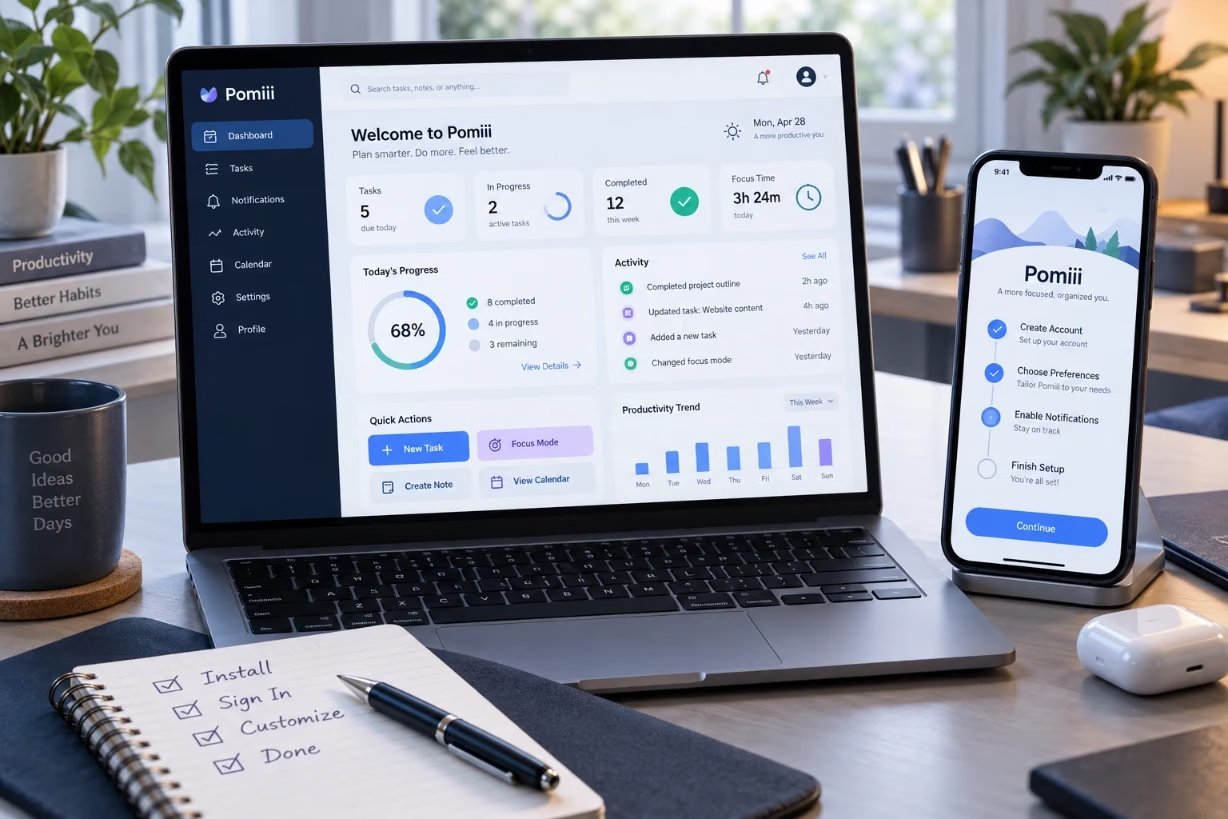
Pomiii is a simple but powerful productivity application that helps you stay focused, manage tasks, and track your time with very little setup. I will walk you through pomiii features, step by step setup, and real use tips so you can start using it with confidence.
What pomiii Tries To Solve For You
When I first look at any new app, I ask one thing: what real problem does it solve in my day. Pomiii is built around a very common struggle staying focused on one thing at a time while still keeping track of tasks, breaks, and progress. If you jump between emails, calls, social media, and half-done projects, pomiii gives you a calm center to work from.
At its core, pomiii combines three ideas in one place. It uses a focus timer so you work in short clear sessions. It adds task lists so you know exactly what to do next. And it tracks your work history so you can see patterns over days and weeks. That blend makes pomiii useful for students, remote workers, freelancers, and really anyone who wants a bit more control over their time.
Key Features Of The pomiii Application
Before diving into step by step setup, it helps to know what pomiii can actually do. Once you understand the main features, the rest of the setup will feel natural instead of confusing.
Focus Timer Based On Short Work Sessions
The heart of pomiii is a focus timer. The app uses short bursts of deep work followed by short breaks. A common pattern is 25 minutes of focused work plus a 5 minute break. Some people prefer 50 and 10. The point of pomiii is to reduce mental fatigue by breaking your day into clear, manageable blocks.
Each time you start a session, pomiii keeps you locked into one task. When the timer runs out, you take a breath, move, grab water, then come back fresh. Over time you build a rhythm. Instead of getting tired after an hour, pomiii helps you stack several clean sessions in a row without feeling burned out.
Task Lists And Simple Project Organization
Tasks are the second big part of pomiii. You can create simple to-do items like “Write report section two” or “Review design draft” and pair each one with focus sessions. You might group tasks by project or by type of work, but the idea is always the same you choose a task, start the pomiii timer, and keep your attention there.
Pomiii usually lets you mark tasks as pending, in progress, or done. For a lot of people, that visual shift from left to right or from gray to green gives a nice sense of momentum. It also avoids the common trap of keeping everything in your head. Once your brain learns that pomiii holds your list safely, your mind is free to focus.
Work History, Stats, And Progress Tracking
The third pillar of pomiii is tracking. Each focus session, each finished task, and each break gets recorded. Over a day, you can see how many focused minutes you actually gave to a project. Over a week or month, you see patterns: when you are sharp, when you tend to drift, which days you do your best work.
I like to treat pomiii stats as a mirror, not a judge. The numbers simply show how you work right now. From there, you can adjust. Maybe you realize that three morning sessions with pomiii do more for you than any late night push. Once you see the data, scheduling your time no longer feels random.
Notifications, Sounds, And Gentle Reminders
Pomiii usually includes sound alerts or subtle notifications when a work session ends or a break is over. These nudges matter more than you might think. If you always have to watch the clock, your attention never fully settles on the task. With pomiii alerts, you can relax into the work because the app will tap you on the shoulder when it is time to change gears.
Most versions of pomiii let you pick softer or louder sounds, or even go silent and just use pop up alerts. That way you can match the style to your work setting, whether you are at home, in a shared office, or in a library.
Cross Device Syncing And Access
Many people now switch between laptop, phone, and tablet during a single day. Pomiii tends to support this pattern by syncing your tasks and timer history across devices. You might plan your day on a desktop, then run pomiii sessions from your phone during meetings or while studying in a café. The smooth transition is important if you want to keep the system simple instead of juggling separate timers and lists.
Basic Setup Instructions For pomiii
Now let us walk through how to set up pomiii from first launch to your first productive day. These steps may vary slightly depending on the exact version or platform, but the overall flow stays similar.
Step 1: Install And Create Your pomiii Account
Start by installing the pomiii app from your usual app store or as a web app if that is an option. Once installed, open the app and create an account using your email or a sign in option like Google or Apple. Creating an account keeps your settings, sessions, and tasks synced, so it is worth doing even if you usually skip it in other tools.
When you finish, pomiii should take you to a simple welcome screen. Often you will see a default timer already set up and maybe an empty task list ready for your first items.
Step 2: Set Your Default Focus And Break Durations
Next, go into the settings area of pomiii and look for timer durations. The classic pattern is 25 minutes of work followed by a 5 minute break. After three or four cycles, you can schedule a longer break of 15 to 30 minutes. Many people feel comfortable with this classic structure, but pomiii is flexible, so you can tune it to your needs.
If you are new to focus timers, I suggest starting with the default. After a few days using pomiii, you can adjust to shorter or longer sessions. Creative work might prefer slightly longer blocks, while very intense problem solving might benefit from shorter ones. The key is to pick one setup and stick with it for at least a few days before you change it again, so your brain has a chance to adapt.
Step 3: Configure Notifications And Sound Options
In the same settings area, look for notifications. Decide how you want pomiii to call your attention. I usually keep sound alerts on but choose a gentle tone that does not scare me out of concentration. You may want visual pop ups if you often work with headphones or keep your device muted.
Also check if pomiii has an option for “do not disturb” mode while a session is running. If it does, you can block other alerts during focus time. This single choice can double the value of pomiii because it stops your phone or computer from pulling you away right when you are locked in.
Step 4: Create Your First Task List
Now move to the task or project section in pomiii. Create one list for today’s work. Keep it short and realistic. A simple pattern might be three main tasks that truly matter and two small tasks that you would like to handle if you have time.
When I start with a new tool like pomiii, I avoid dumping my entire life into it on day one. That can feel heavy and overwhelming. Instead, I begin with just the next few steps. Over time, I add more tasks and projects once I trust how pomiii works for me.
Step 5: Link Tasks To Focus Sessions
Once your list is ready, click on the first important task, then start a pomiii focus session. Many versions let you tag that session with the task name. This link between a timer run and a task is where the magic happens. Later, when you review your work history, you see not just “3 sessions” but “3 sessions on article outline” or “2 sessions on exam prep.”
During the 25 minutes (or whatever duration you chose), stay inside that one task. If your mind brings up something else, jot it in another pomiii task or a small note, then come right back. The app handles the clock for you. You just need to bring your attention.
Step 6: Use Short And Long Breaks Wisely
When pomiii signals the end of a session, shift into a break. This part can feel strange at first, because many of us are used to pushing until we crash. Breaks are not laziness here they are part of the system. Get up, stretch, get water, look away from screens. Avoid diving into social media, because it can drag you beyond the break time.
After several cycles, pomiii will suggest a longer break. Take it seriously. This is where your brain resets. I like to step outside for a bit of fresh air or do a short walk. When you come back, you will be ready for another block of deep focus.
Advanced pomiii Setup For Different Work Styles
Once you understand the basics, you can shape pomiii more closely to your life. Different people use the same tool in very different ways, and that is one of the strengths of a simple system like pomiii.
Using pomiii For Deep Creative Work
Writers, designers, developers, and artists often need stretches of time without any noise. If you work in a role like that, consider using slightly longer focus sessions in pomiii, such as 45 or 50 minutes. This gives you time to warm up and then sink deeply into your work before the next break.
You can also create separate task lists in pomiii for “idea work” and “production work.” Idea sessions might focus on sketching, outlining, or exploring. Production sessions are for finishing things that are already defined. Over time, you may notice which type of session gives you your best output, and schedule more of those when your energy is highest.
Using pomiii For Studying And Learning
Students often fight long reading lists and heavy courses. Pomiii can turn that mountain into a ladder. Create a task list for each subject, such as math, history, or language. Then run two or three pomiii sessions per subject each day instead of trying to force five hours on a single topic.
Shorter sessions, like 20 minutes of reading plus 5 minutes of recall, work especially well. During the break, you can close your eyes and repeat what you just learned or jot quick notes. When exam time comes, your pomiii history will show you which subjects got the most attention and which ones you might need to focus on next.
Using pomiii For Remote Work And Freelancing
For people who set their own hours, it is easy to blur work and personal time. Pomiii can act like a gentle frame for your day. Start the morning with a short planning session in the app. List three major outcomes you want by evening. Then assign one or two pomiii sessions to each.
You can even treat your breaks as micro habits. After each pomiii cycle, maybe you stretch, drink water, or check in with a family member. This turns your day into a chain of small wins instead of one long tiring block in front of a screen.
Practical Tips To Get The Most From pomiii
Setting up pomiii is the easy part. Making it part of your life is where the real value shows up. These are habits I find helpful when teaching people to use timer based apps like pomiii.
Protect The First Session Of Your Day
Try to give the first pomiii session of each day to your most important work, before email and chat and meetings grab your attention. Even if it is just one 25 minute block, this single session often decides how the rest of the day feels. You start with a win instead of a reaction.
Review Your pomiii Stats Weekly
Once a week, maybe Friday afternoon or Sunday night, open the stats or history tab in pomiii. Look at how many sessions you ran, which tasks took the most time, and which days felt best. Ask yourself a simple question: Does this match what matters to me.
If not, adjust the coming week. Move key tasks earlier in the day. Shorten or lengthen your pomiii sessions. Decide which kinds of work deserve more focused time and which can stay in shallow email mode.
Keep Your Task List Honest
It is tempting to keep adding tasks to pomiii without clearing old ones. Over time, that turns into digital clutter. Once a week, clean your lists. Delete or archive tasks that are no longer relevant. Break huge tasks into smaller pieces that fit one or two pomiii sessions.
An honest list means that when you open pomiii, you do not feel dread. You feel clarity. Every item there is something you can actually imagine doing in the near future.
Use Labels Or Tags For Context
If your version of pomiii supports tags or labels, use them to mark tasks by energy level or location. Examples might be “high focus,” “low focus,” “calls,” or “offline.” When you sit down and feel tired, you can filter by low focus tasks and run a gentle pomiii session on something simple. When you feel sharp and ready, you filter for high focus and protect that time.
Common Mistakes When Using pomiii And How To Avoid Them
Even with a well designed app like pomiii, people sometimes fall into traps that make the tool feel less helpful. Knowing these ahead of time can save you frustration.
Starting Too Many Timers Without Clear Tasks
Some users hit start on the pomiii timer just to feel productive, without choosing a precise task. This leads to fuzzy sessions where you jump between tabs and end up with empty stats. Always pair each pomiii session with one clear outcome, even if it is small like “outline one page” or “clean inbox to 20 emails.”
Ignoring Breaks Or Skipping Them Entirely
Ignoring breaks is another common issue. It feels like you are working more, but in reality, you drain your focus. The whole point of pomiii cycles is the rhythm. Work, rest, work, rest. If you skip the rest, the system loses its power. Treat breaks as part of the work, not a reward after it.
Changing Settings Too Often
Because pomiii is flexible, you may feel tempted to change your session length every day. That makes it hard for your body and mind to adjust. Pick one pattern and give it at least a full week before changing. You can experiment later once you understand how you respond to different lengths.
Why pomiii Works Well For Many People
The reason pomiii helps so many different types of users is simple. It respects how human attention naturally works. Our brains like clear goals, limited durations, and visible progress. Pomiii offers all three through its timer, task lists, and history. You do not need complex systems or heavy training. With a little practice, the routine becomes second nature.
Over time, many people using pomiii notice that they feel calmer around their workload, even if the total amount of work has not changed. The difference is how that work is shaped. Instead of a huge fog of “I have so much to do,” you have small, defined blocks that you handle one at a time. That simple shift often brings relief and a sense of control.
Final Thoughts On Setting Up pomiii
If you want to try pomiii, I suggest you give yourself three full days of honest use. Install it, set a basic 25 and 5 pattern, create a short task list, and commit to running at least eight pomiii sessions across those days. Notice how your focus feels by the end of day three compared to day one.
Pomiii does not remove all stress or fix every schedule problem, but it gives you a tested way to face your work. With steady use, it becomes less of an app and more of a quiet routine that holds your day together. Once you feel that shift, pomiii stops being just another tool on your phone and turns into a small but steady ally in how you use your time.